Categories
Digital Advice and Cautions Email

Avoiding Email Scams

Avoiding Email Scams

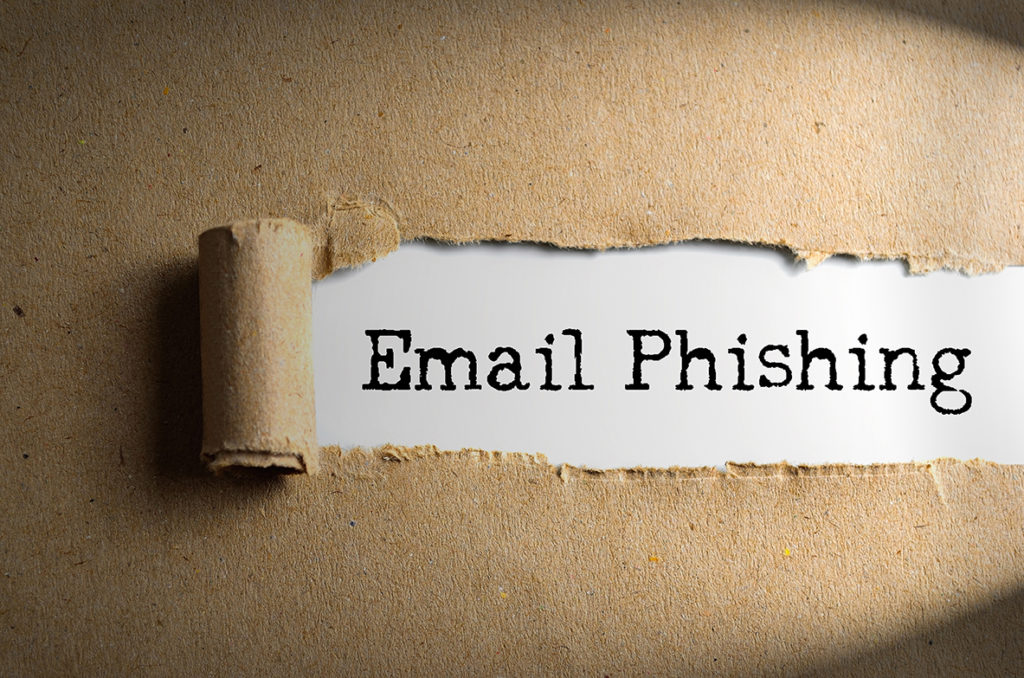
Let’s get real, online scams are everywhere, especially email scams. I for example have received several email scams pretending to be from a very reputable invoicing company who I actually do use. At first glance the emails appear to be legit, however, the biggest giveaway with these were they were going to an email address not actually associated with my account. Scams like these are far too common an easy to fall victim to. I want to take a moment to break down some common email scams and how you can avoid falling victim to them.

Avoiding Email Scams – Know What to Look for and What to Avoid


Recognizing a Legit Email From a Scam Email

Email is a great way to receive fake content (scams). Anyone can go out and buy a list of emails, which is considered against the “law” in the digital world. However, this happens all of the time and it is incredibly easy to do. Be prepared that you will always receive emails you did not actually subscribe to and they could be from scammers. Let me break down how to tell a legit email from a scam email.

Legit Email

  • Free of typos or errors
  • Personalized – Meaning your name is clearly included in the content.
  • From a legit sender with a legit domain in the from email address field – you can find this by simply hovering over the email in your inbox and the from name should appear. Meaning, you don’t even have to open the email to determine if it is from a trusted source.
  • Email subject line is descriptive and informative – Does not include what we call “Click Bait”, which you will learn more about below.
  • You recognize the sender – The email is from a known and trusted source, verified by the from address field.
  • You are expecting the email – The sender is trusted and you were made aware that you would be receiving communications from them via email. You opted in to receiving these emails.

Scam Email

  • Typos, errors, and overall strange language/verbiage
  • Not personalized – the email content begins with something like, “Dear valued customer”, “Hello, dear”, “Dear sir or madam”, etc.
  • From a strange sender – Make sure you recognize the sender before even opening the email. If the from email address looks strange, don’t even bother opening it.
  • These will appear/look like legit emails at a glance – however, upon further investigation like finding typos you will find that it is not from a legit sender.
  • Email subject lines are alarming or strange – For example you might see something like “Urgent Message from IRS” this is bait to get you to open the email.
  • Request for sensitive information – A legit company will never request any personal or sensitive information via email. This includes passwords, usernames, credit card information, etc.
  • Email attachments – Normally businesses will direct you to their website to login and view the attachment. If you receive an email urging you to open an attached file it is likely not legit.
  • Hyperlinks – With scams the entire email can be one huge hyperlink, meaning if you accidentally click anywhere in the email you will be taken to the spammy URL. Hover over the email, if you did open it. From there you can right click on the body of the email and if the option to open the link in a new page appears this means the entire email is a hyperlink – do not open the link.
  • Visible Hyperlinks – If the email contains an actually link for your to click on, hover over the link and you will see the destination URL. This url will show up in the bottom left hand corner of your screen on desktop. Make sure it matches the sender domain and is taking you to an authentic page. If the url looks strange do not click on it.

Most Common Types of Scam Emails

Now that you have more information on how to spot a legit email from a scam, lets review the most common types of scam email you will see:

This list was provided by: https://www.usa.gov/stop-scams-frauds

Taking Action Against Email Scams

Alright so you have done your homework and now are recognizing fraudulent/scam emails. Report them! Take action and send any emails that are suspected to be fraudulent to: phishing-report@us-cert.gov

Or you can reach out directly to the source, meaning if the email is pretending to be from PayPal for example, reach directly out to PayPal and inform them.


Categories
Digital marketing For the Workplace Freelancing

Becoming a Freelancer

Becoming a Freelancer – Understanding What That Means

So, you have thought about becoming a freelancer, well let me take a moment to share some of what I have learned thus far in my journey. I have been a career freelancer for quite some time now and I get asked frequently about what I do and how I got into this type of work. Well, I have busted my ass to get where I am today. I didn’t just wake up one day and decide to be a freelancer. While that thought was always appealing to be my own boss without really having to deal with all of the bullshit that goes along with being a “boss”, it was work to get here. So, here it goes…here are some of my freelancing tips based on my personal experience.

Becoming a Freelancer – Things to Know

Becoming a freelancer

You Have to Start Somewhere

Your start most likely will take place by working a full-time job AND taking on additional freelance projects as you can find them. When I first started freelance work it was just a side gig as the work was not steady and when I first started the work was very very hard to find.

Finding Work Can be Tough

While this is not meant to deter you from living your dream as a freelancer, know going into it, getting your start is going to be tough. Finding your first clients is probably the hardest since you don’t have the freelance experience yet and you are pretty much relying on someone taking a chance on you. Also, if you don’t have a super huge circle of professional contacts you might be relying on cold calling/emailing potential clients.

Initial Work is Less Than Ideal

The expression goes, “Beggars can’t be choosers”, that is completely accurate with a new freelancer. Take the work even if it is not necessarily something you love to do. Work on building that portfolio one project at a time. Anything is better than nothing when you are first starting. Honestly, even to this day I still will take on projects that are less than riveting. For example, I just completed a project in which I went through thousands of files and properly named and organized them, can we say yawn? However, it allowed me to work with a new client, grow my portfolio, and make some dough!

Bending Over Backwards

That work experience is so valuable that you will likely find yourself bending over backward initially to keep those oh so valuable clients. Trust me…my first big client, I did anything and everything they asked of me or needed. Even if it was totally outside my scope of expertise, I would figure it out for them. Looking back on it I cannot believe the hoops I jumped through for them, but in reality, this large client was directly responsible for helping me land more and more clients due to building up my freelance portfolio.

Get Ready to Kiss Some Client Booty

As a new freelancer, you need to be ready to kiss some client ass – at least initially. Once you grow you can better set boundaries and be more selective with clients – so keep in mind this ass-kissing mentality is only temporary!

Income is Not Steady

In the beginning, this is true. Freelancing is wonderful, but at the very beginning, it will be hard to rely on it as your sole income. Be prepared to simultaneously hold a more stable income job while pursuing your freelance career. Not to scare you, but unless your clients are locked into a contract, which for normal freelance projects they are not, they can cut ties with you at any time. Yikes! That means that the income you have been relying upon them is poof! Gone in a flash! Set yourself up for success by always having a backup income plan.

Finding Work

In the beginning, I did a lot of direct reach out online and in person. I initially picked an industry of interest and pursued clients in that industry. For me initially, that was bars and restaurants. Which in retrospect is funny, because I am very hesitant now to work with these types of clients.

Anyways! I would do research on the businesses and their online presence. Then, I would then reach out with a case to present. Showing them why they needed me and what I could offer them. I would do this most frequently online. However, if I could meet with a manager onsite I would prefer to do it in person. Be prepared it is not easy to get someone to give you some of their time to chat in person.

Take Home Message to Becoming a Freelancer – Get Ready to Take The Leap

Sometimes in life you just have to take that leap of faith and hope things work out for the best. Like anything worthwhile in life it will be work and you may fail. You never know if you don’t try! Get ready to hustle!

Categories
For the Workplace Tips and tricks

Flexibility = Employee Happiness

As someone who has worked in just about every industry, there is one thing that I have found to be true across the board no matter what industry you are in…we all hate our jobs at one point or another. Are we all nodding in agreement? I thought so!

Why do we hate our jobs? Great question, but very hard to generally answer as the reasons can vary greatly from one workplace to another. However, I have found that in traditional office settings more flexibility equals happier employees. Meaning, we hate our jobs less if there is more flexibility.

So, what do I mean by flexibility?

  • Allowing employees to set their own hours – within reason
  • The ability to work remote – if possible
  • Taking unpaid time off – if employees are out of PTO, allowing them to take unpaid days off
  • Dress code – being flexible with what employees are allowed to wear
  • Do not micro manage – checking in is good, however, no one likes to be micromanaged, it makes employees feel undervalued and not trusted

Hey, Employers…Small Changes Make a Big Difference

flexibility equals employee happiness

As employees, we have little control most of the time over office protocol and that is why I am speaking to you employers! Your employees will hate their jobs less if you give them a little flexibility! Don’t you ultimately want happier employees who actually like coming to work? Of course, you do! So, lighten up a bit…For example, if you work in a very conservative environment, give your employees one day a work to dress however they like. This is a small change, but can actually help your employees look forward to coming to work for that casual workday!

Other Small Changes That Increase Employee Happiness

  • Take a meeting on the go – get your employees out of the office and mix up the traditional meeting setting
  • Show them that you appreciate them – buy them lunch or plan a happy hour on the company’s dollar
  • If possible let them work remote – I know that this is not an option for every work environment, but if it is possible, give your employees this option or have them earn it through setting goals for them to achieve
  • Give them the option to take an unpaid day off – sometimes employees really need that mental health day, but they are out of PTO – give them the option

Take home message, I know that some employees will be problem children. Meaning, they will do something stupid to ruin it for everyone. However, don’t let one bad apple spoil the whole bunch. Go case by case and give your employees freedom and flexibility they can handle.


Categories
Social Media

10 Simple Facebook Ad Basics for Business Owners

When it comes to Facebook most business owners are eager to use this network, but quickly realize there is so much more to this network than just daily postings. One of the biggest facets of this network is it’s complex and comprehensive ad capabilities. This leaves most small business owners having no clue to even know where to start…Don’t fret you are not alone!

Let me break down 10 simple Facebook ad basics for business owners:

1. Know Your Audience

Before you even begin to think about advertising on Facebook, you should have an idea of who your target audience is. Meaning, you should know basic demographics of your target audience including; gender, age, interests, and location. In general, this is good information to know even if you are not planning on advertising on Facebook. Knowing your target audience equals more successful marketing.

2. Have a Marketing Plan/Strategy

Before you dive into Facebook ads, first ask yourself do you have a marketing strategy? If not, I would highly recommend hiring a consultant to help you develop one.

3. Budget

If you have already created a general marketing strategy, this strategy should lay out a budget for Facebook ads. Have a set budget with clear goals attached to them.

4. Goals

What are your goals with advertising on Facebook? All of us, of course, are looking to make more money, but let’s think a little smaller. Are you looking to increase your brand awareness? Are you looking to directly drive sales and see conversions online? Are you looking to grow your email list? Are you looking to get more people to come to an upcoming event? Business goals are endless, so, before you dive into Facebook ads, have a clear idea of what you hope to achieve with them.

5. Creative/Imagery

Does your business have a good stock of high-quality images? If not, you will need to invest in some great stock imagery or hire a professional photographer to get some great shots of your product. Imagery can make or break a Facebook ad. You have a split second to get users to stop scrolling and intriguing images are the way to do it.

6. Content

When it comes to Facebook ads your content or text needs to be short, sweet, and to the point. Concisely and effectively writing ad copy can be tricky and that is why professional writers exist. Poor ad copy can greatly impact the success of your ad, so when it doubt hire a copywriter to help!

7. Understanding a Boosted Post

A boosted post is a good way to begin to play with advertising features on Facebook. It is easy to use as you will see a “boost post” option on the bottom right corner of your posts. If you select this button you will get the option to select targeting. Targeting in a boosted post is much more simplistic than with the normal Facebook ads. Boosted posts are a great way to begin to play around with Facebook’s advertising capabilities.

Best practices when boosting a post:

  • The post should have a clear CTA (call to action)
  • Establish a goal – what do you want to achieve with boosting this post?
  • If you know your audience this is where you can apply those demographics, interests, and location
  • Watch to see what posts perform well and then try boosting successful posts
  • Be mindful of your Facebook notifications – Facebook will actually recommend when to boost posts

8. Establish a Business Manager

If you are determined to manage your own Facebook ads you will need to establish a business manager on Facebook. You can view step-by-step directions here.

9. Using Ads Manager

Okay, this is where it gets a bit complex…now that you have your business manager account you can access ads manager. Follow the step-by-step directions here.

10.  Keep it Simple

The first time you attempt to set up an ad, keep it simple. Use the basic features, meaning avoid the advance settings. Facebook will walk you through the ad process. However, a cautionary note Facebook ads can get very complex,  I would highly advise hiring an expert to set up the ads. Facebook ads are constantly changing and it is the expert’s job to know everything there is to know.


Categories
Digital Advice and Cautions

10 Tips for Hiring a Trusted Web Developer

So, you are thinking about building a website for your business? That’s fantastic, however, this is likely to be a somewhat spendy adventure. That being said, over the years I have had my fair share of experience in working with tons of web developers and have learned some hard and expensive lessons about working with trusted web developers.

I have put together these 10 tips to hiring a trusted web developer:

Portfolio

Any trusted web developer should be able to provide you with samples of their work.

Website

Check out the developer’s website. Does it look like a website you would want? Does it look professional? If not, I would look elsewhere…A trusted web developer should know that their personal website is going to say a ton about the quality of work they are providing.

Rate/Cost

Are they upfront and transparent about estimating the cost of the project? A trusted web developer should be able to give you a project total before beginning the project and should always get written permission before doing work that is over the estimated budget.

Testimonials

Have you heard from others about their experience in working with this web developer? Ask around and see if anyone has anything positive or negative to say about the web developer. Can they provide you with some past clients as references for you to reach out to?

Recommendations

I am personally biased on this one so take it with a grain of salt. I firmly believe in asking for recommendations when it comes to a web developer. I normally will not work with a developer unless someone I personally know recommends them or can speak to the quality of their work.

Communication

A trusted web developer should be willing to communicate with you on a regular basis to answer questions or provide updates. Before hiring a developer I would highly recommend adding into your contract the frequency of communication expected.

Knowledge

Test their knowledge. I know that this is somewhat hard to do for average folks with little knowledge on websites, but you should be prepared with questions. Some of my favorites are:

  • What website platforms do you build on and why?
  • Will the website you build be user-friendly? Meaning, can I go in and easily make changes?
  • Do you provide any kind of training so I personally can learn how to use the website and make edits as needed?
  • Will you properly hook the website up to Google Webmaster tools?
  • Will the website be optimized for SEO? How will you do this?
  • Will the website be optimized for mobile use?
  • Will all images be compressed and properly sized so page speed is not affected negatively?
  • Will you perform a thorough check of the website to make sure everything is functioning correctly?
  • Do you have any kind of warranty? Meaning, if something breaks on the website will you come in nd fix it?

Get a Second Opinion

Much like taking your car into a mechanic, you should always get a second, third, or even fourth opinion. It is great to know what is out there and allow several web developers to bid for your project.

Who Owns What?

This is one of the biggest problems I have seen when working with untrustworthy web developers…meaning, I have seen developers build websites for users and they actually end up owning everything. They buy the domain in their name, they host the website through their own account, etc. As the business owner, you should 100% own everything and everything should be in your name!

Things you should have access to and own:

  • Full website access
  • Your domain
  • Hosting
  • Google webmaster tools
  • Any social accounts
  • Any email accounts

A Contract

When working with a web developer you should always have a written contract. They should provide one, however, if they do not, write one up and if possible have a lawer look over it. Have all agreements in writing in case anything should go wrong and legal action needs to be taken.

Categories
Tips and tricks

Freelancers, Dress for Success

When it comes to being a freelance contractor there are tons of benefits which include a flexible schedule, working remote, and much more. However, freelancers tend to become a little too comfortable. What I mean here is, more times than not when I meet with a new freelancer they show up to our meeting looking like they just rolled out of bed. I get that our meeting is not a formal interview by any means, but whether we like it or not our physical appearance is usually the first thing people make an impression on. Honestly, if you look a bit disheveled or a little too casual that is how your work will come across. Not good…

Here are some tips for dressing for success as a freelancer:

  1. Know your environment – Where are you meeting? This will help you determine what is appropriate to wear.
  2. Know your audience – Who are you meeting with? If you are meeting with a large client you may want to dress more business casual than if you were to meet with a small local cafe owner.
  3. Avoid sweats – Anytime you are meeting with a client no matter how big or small, sweats should never be worn.
  4. Layers – This is one of the greatest tricks ever as a freelancer. When you are casually working at a coffee shop, dress casual, something like jeans and a t-shirt. But be prepared for that afternoon meeting by bringing with a clean ironed button-down shirt, a sweater, and some accessories. After your meeting, you can then get back into casual mode.
  5. Plan head to toe – That’s right, your footwear matters. Shoes can either dress an outfit down or dress it up.
  6. Personal hygiene – This seems like a simple one, but you should always smell nice for a meeting as well as look put together with clean styled hair. This includes facial hair as well, groom and trim that beard before your meeting!
  7. Dress for an interview – When it doubt, dress like you are going for an interview. When you are meeting a client for the first time it is very much like an interview, show your client you care and are professional.


Categories
Digital marketing Social Media

Social Media – Understanding Facebook Ads

Understanding Facebook Ads

Understanding facebook ads

So, your business is set up on social media and that means it is now time to start understanding Facebook ads and learn how to use them effectively. Let us break the Facebook ad process down step by step.

Step 1

Understanding Facebook ads

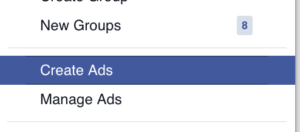
Select “Create Ad” from the drop-down menu on the right-hand side of your screen.

Step 2

Choose Your Objective

Understanding Facebook ads

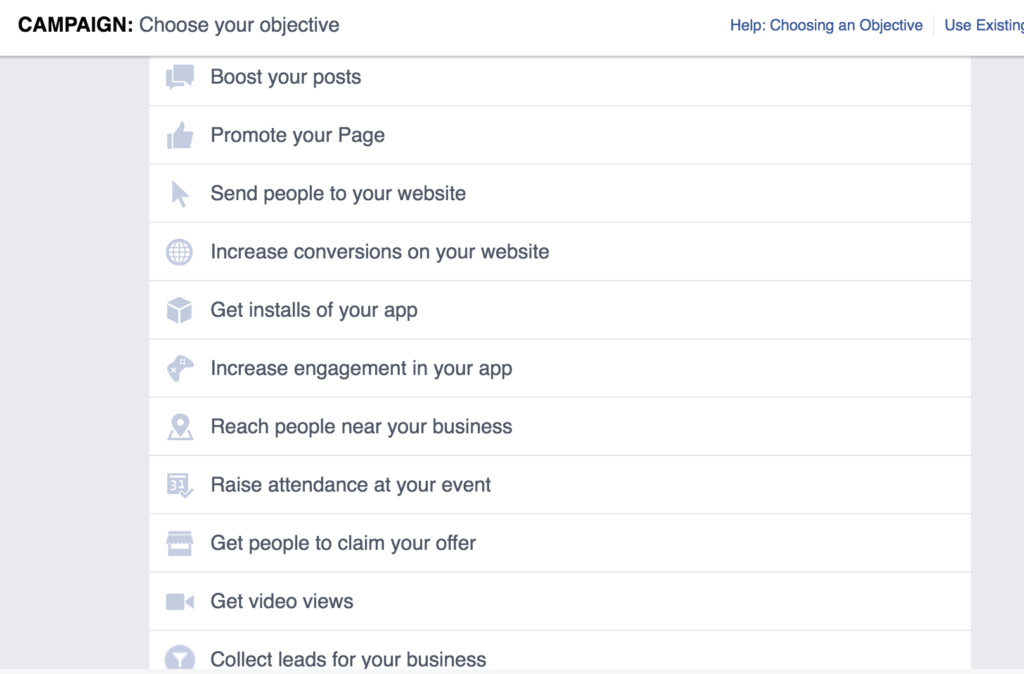
Your objective is what you want your ad to achieve. Before creating an ad be sure you have a clearly defined goal/goals when it comes to Facebook ads.

Step 3

Understanding Facebook ads

Give your ad set a name – for the sake of this tutorial we are creating an ad to gain more likes. You may select advanced options on this screen and set your campaign spend limit.

Step 4

Understanding Facebook ads

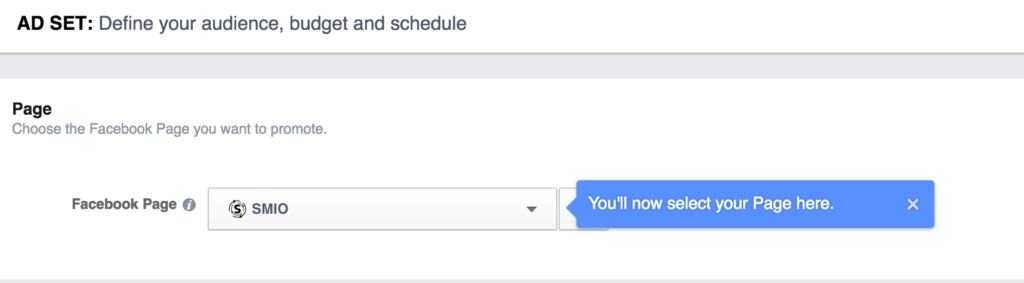
Select audience and budget button. You will then be taken to a screen where you can choose what business page you want to run the ad for.

Step 5

Understanding Facebook ads

Understanding Facebook ads.

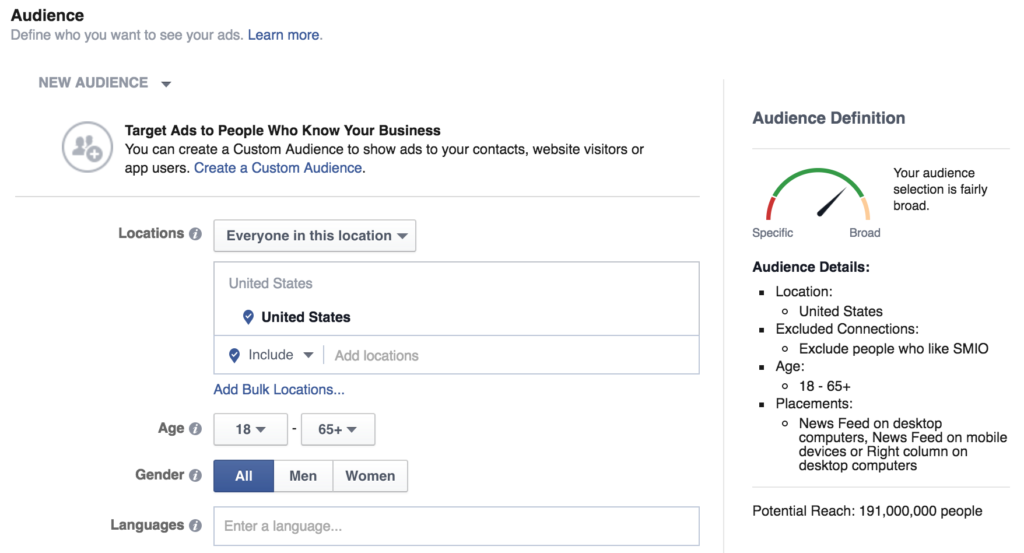
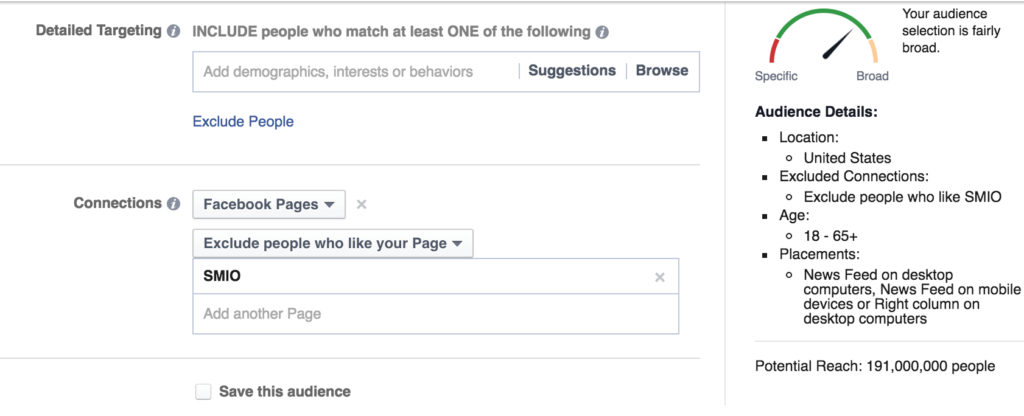
Create your target audience, meaning who you want to see and interact with your ad. There are a number of ways to target your audience and it is very much recommended that you know who your target demographic is before creating the ad. Ways to target include location, gender, age, interests, and connections to your business page. Targeting is extremely important and may require tweaks as you figure out what works and what doesn’t.

You will also notice on the right-hand side of your screen you can see how broad or clearly defined your audience is, potential reach, where the ad will be placed, location, age, and also connection settings.

Step 6

Understanding facebook ads

Set your budget – choose a daily budget or lifetime budget.

Schedule your ad – options include running the ad continuously or choose a start and end date.

Bid Amount – you can let Facebook automatically set the bid or you can enter a bid based on how much each page like or action is worth to you. I would recommend setting the bid amount to automatic.

When you get charged – Choose how/when you would like to be charged.

Delivery type – Choose when your ads will be shown – I recommend leaving this at the standard option.

Step 7

Understanding Facebook ads

Understanding Facebook ads

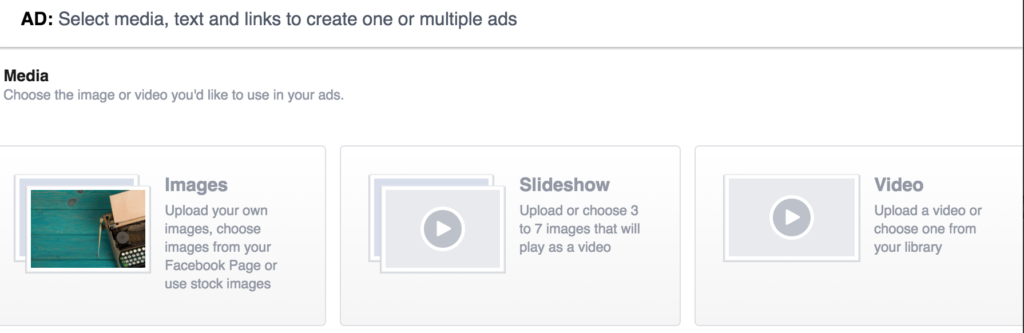
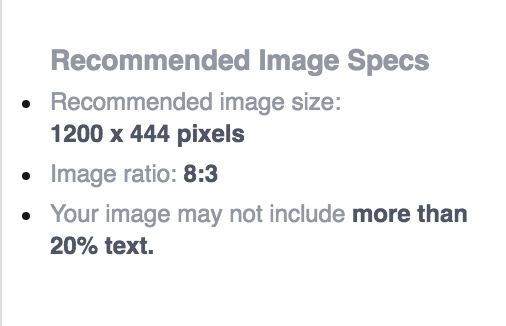
Select your ad creative – options include standard photos, a photo slideshow, or video. Each option will include recommended image specs, video specs, etc. after you select your creative type.

Step 8

Understanding Facebook ads

Understanding Facebook ads

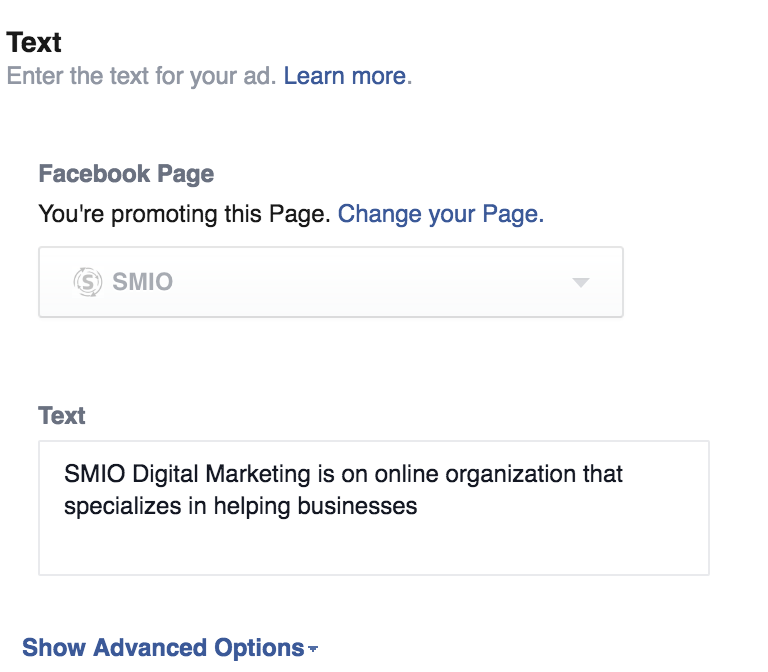
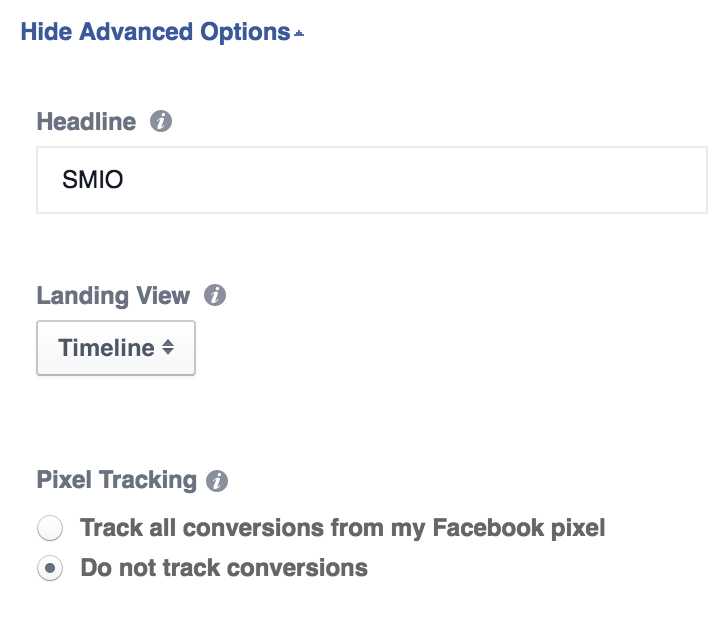
Choose the text to appear with your ad. Select advanced options to select a headline and to apply a pixel tracking code, which is highly beneficial for monitoring conversion on your website. You may also choose a landing page view – which is what your audience will see when they click on your ad.

Understanding Facebook ads

While you are updating creative or adding text to your ad you will be able to preview the changes. This allows you to see what your ad will look like before it goes live.

Last Step!

Understanding facebook ads

Once your ad looks great and you are comfortable with the targeting and budget, place order!

Understanding Facebook Ads – The Forever Changing Process

It is important to understand that Facebook ad guidelines are  forever changing, and this is where hiring a social media manager can come in handy! Don’t worry about staying up to date with the changes, let a professional manage all of your social media ads for you, contact us today to learn more.


Categories
Digital marketing Pros and Cons

Which Came First – The Business Website or Marketing Efforts?

website design

A Great Business Website or Marketing?

When it comes to developing an online presence for your business, have you ever wondered which should come first, the business website or paid marketing efforts? A majority of individuals will lean towards marketing and the reason is because you want to get your name out there, you want people to know you and your brand. However, putting budget towards marketing before you have a solid website is like trying to run before learning to walk, it doesn’t work.

If it Seems Too Good to be True…

Business Website

A user-friendly, clean looking, and mobile-friendly website should be at the top of your priority list as a business owner. It is far too easy to overlook the importance of a great website, as many times owners simply see the dollar signs attached to building a great website. Yes, I get it, designing and developing a website is not cheap, but remember you get what you pay for. I say this because there are far too many scam artists in the digital marketing world promising the world to business owners for very little cost. Seems to good to be true, right? That is because it is, don’t fall for it. If you are paying very little to have a website designed and developed, chances are you are going to get exactly what you just paid for – a cheap website put together likely by someone who has very little experience.

Business Website First, Marketing Efforts Second

Whether we like it or not, a business website is more important than ever. As users we no longer go shuffling through a phone book to find the services we need, instead, we get online and do a search. This is where a well developed and designed business website comes into play. Before you go investing money in marketing efforts, take a look at your website first. Website first, marketing second.

Categories
Content Digital marketing

Product Photography in Minnesota

Product Photography MN

Product Photography in Minnesota – It’s More Important Than You May Think

When it comes to owning a business, images may speak louder than words, and that is where product photography in Minnesota services come into play. As you may know we are extremely visual creatures and imagery has the power to influence those very important first impressions we form. Think about the last time you went to read an article and there were no images, what was your reaction? Well, if you are like many of us you probably quickly scrolled through the content and moved on to the next article. Meaning, you lost interest due to the lack of visual stimulation.  This shows us that no matter how great your content is, images are a necessity to keep readers engaged and interested. This is especially true if you are a business owner.

Product Photography MN

Not only are we visual creatures, but we are also part of the right now generation. Meaning, we are quick to judge, form an impression, and move on to the next thing. This places even greater emphasis on having high quality images to grab user’s attention and keep it. Not only do great images grab attention, but they can also effect how your business is perceived. As a business owner, the primary goal for a first impression is to leave users wanting more. You want the consumer to follow up to learn more, or better yet, actually become a paying customer. In order to do so, careful thought needs to be put into the initial imagery potentional customers are exposed to.  While you can buy professional high quality stock images, we would advise that you enlist the help of professional photographers to capture images that are unique to your business. Give consumers of a sense of who you are as a business through high quality imagery.

SMIO Digital Marketing is a Minneapolis, MN based company and we proudly offer our product and commercial photography services to the entire state of Minnesota. Want more information on our services? Are you located out of state, but want to utilize our product photography services? Contact us today to learn more.


Categories
Content Digital marketing

Creating Your Digital Marketing Strategy

How the Heck do you Create a Digital Marketing Strategy?

If you are business owner you have probably heard more than once that a digital marketing strategy should be an important piece of your overall business plan. We couldn’t agree more, however, creating this strategy is easier said than done. There is a lot of work that goes into creating a successful digital marketing strategy, and our advice would be to let someone else do it for you, like us.  We have years of experience in the field are the pros when it comes to creating killer strategies that will ultimately help your business’s online presence grow, which is more important than ever. The greatest part about working with the pros is you can sit back and let us do the work for you.

Digital marketing strategy

So, you may be wondering, how exactly we go about creating this digital marketing strategy? Great question, let us break it down for you:

  • Get to know our clients – We take the time to get to know who you are and your business
  • Establish goals – Help you define your online/general marketing goals
  • Perform audits – This helps us determine the best strategy for you
  • Build a custom plan just for you

Digital Marketing Strategy, Trust the Pros to do it Best

Whether you are a technology savvy individual or are internet illiterate, we can help. We work with all types of clients and always create a custom approach to help your unique business grow online. This means that no two strategies will ever be the same, because no two businesses are exactly the same. Because every approach we take is customized to the client, pricing is always custom. Want to learn more? Contact us today to set up an initial conversation or visit our FAQ page for answers to some common questions you may have about working with us.